
How Spin Works
Spin stays out of your way
Spin is designed to be flexible and gives you the power to choose what you'd like Spin to help you with. For example, if you want to use your current PaaS provider for production deployments, but you just want to use Spin for local development, you can easily do that without Spin getting in the way. Simply delete the docker-compose.prod.yml file and you won't need to do anything else.
What Spin Is Built On Top Of
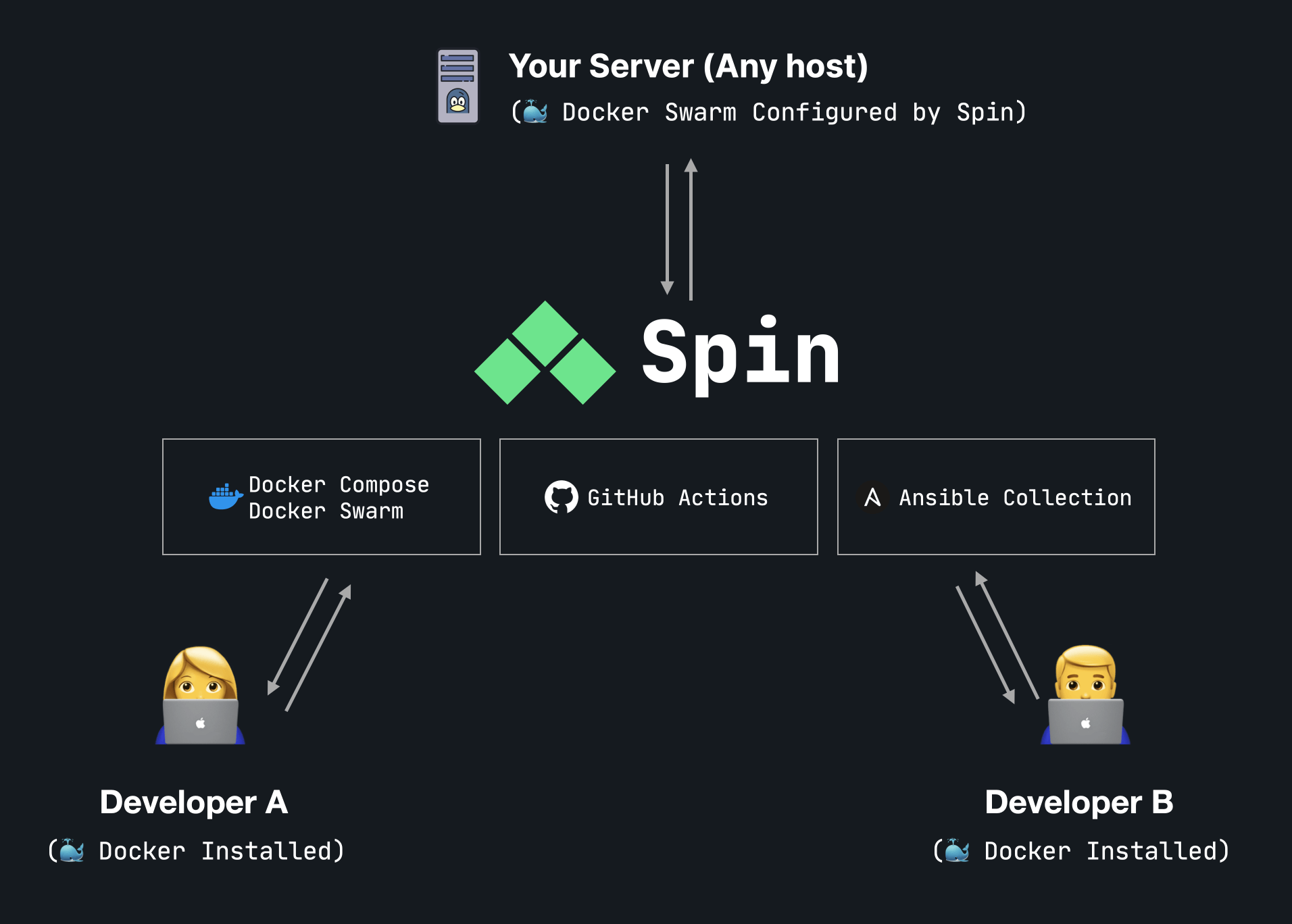
At the core of Spin are:
- Docker Compose (used in local development)
- Docker Swarm Mode (used in production, staging, etc.)
- Ansible (used to ensure your server is configured correctly)
Templates
Spin uses templates to quickly scaffold new projects with Docker Compose configurations for local development and production deployments.
Flexible deployments
With Spin, you have two options for deployments:
- GitHub Actions - We have open source workflows that follow the Spin structure to help you build and deploy your application with ease.
spin deploy- For smaller teams and very simple deployments,spin deploywill deploy your application without any downtime or the headaches of managing a CI/CD pipeline.
Other open source projects we use
Spin accesses and utilizes other open source projects to simplify your development lifecycle experience. The entire system is built on top of open source libraries, but here are a few notable ones to be aware of:
Ansible Collection
- Spin Ansible Collection - Used to provision and maintain your production server.
GitHub Actions
- serversideup/docker-build-action - A simplified syntax to build and publish your Docker images with GitHub Actions.
- serversideup/docker-swarm-deploy-github-action - A simplified syntax to deploy to Docker Swarm Mode via GitHub Actions.
Docker Images
- serversideup/php - PHP Docker images highly optimized to work with Laravel + Spin.
- serversideup/docker-ssh - A lightweight docker image that runs SSH. This is a fantastic method on using a secure SSH tunnel into your database cluster.
- serversideup/docker-ansible - A lightweight docker image that runs Ansible. This allows users to provision their server without needing to know how to install or maintain their Ansible installation.
- serversideup/docker-github-cli - A lightweight docker image that runs GitHub CLI. This allows users to interact with GitHub without needing to install the GitHub CLI on their machine.
Why not just use these technologies directly?
Spin is designed to reduce the learning curve for delivering containerized applications with Docker. This is where we believe the 99% of people are. If you're looking to start a new project and deliver it quickly without breaking the bank, Spin is for you. Everything is designed to have your application disposable, repeatable, and scalable.
For some advanced users that are running massive server farms, you might want to stick to your existing tooling. Spin is focused on launching apps from the ground up with the ability to scale. In large clusters, you might need to write your own tooling to match your existing use case.
The good news is you don't need to use Spin everywhere. Spin is a structure just as much as it is a tool. Spin is designed to be there when you need it and get out of your way when you don't.
Important concepts
Spin's flexibility comes from embracing the Docker Compose Overrides (aka Docker Compose Extends) structure. We use a "base" docker-compose.yml file, then choose a file based on the environment.
Here is a visual of what the file structure looks like:
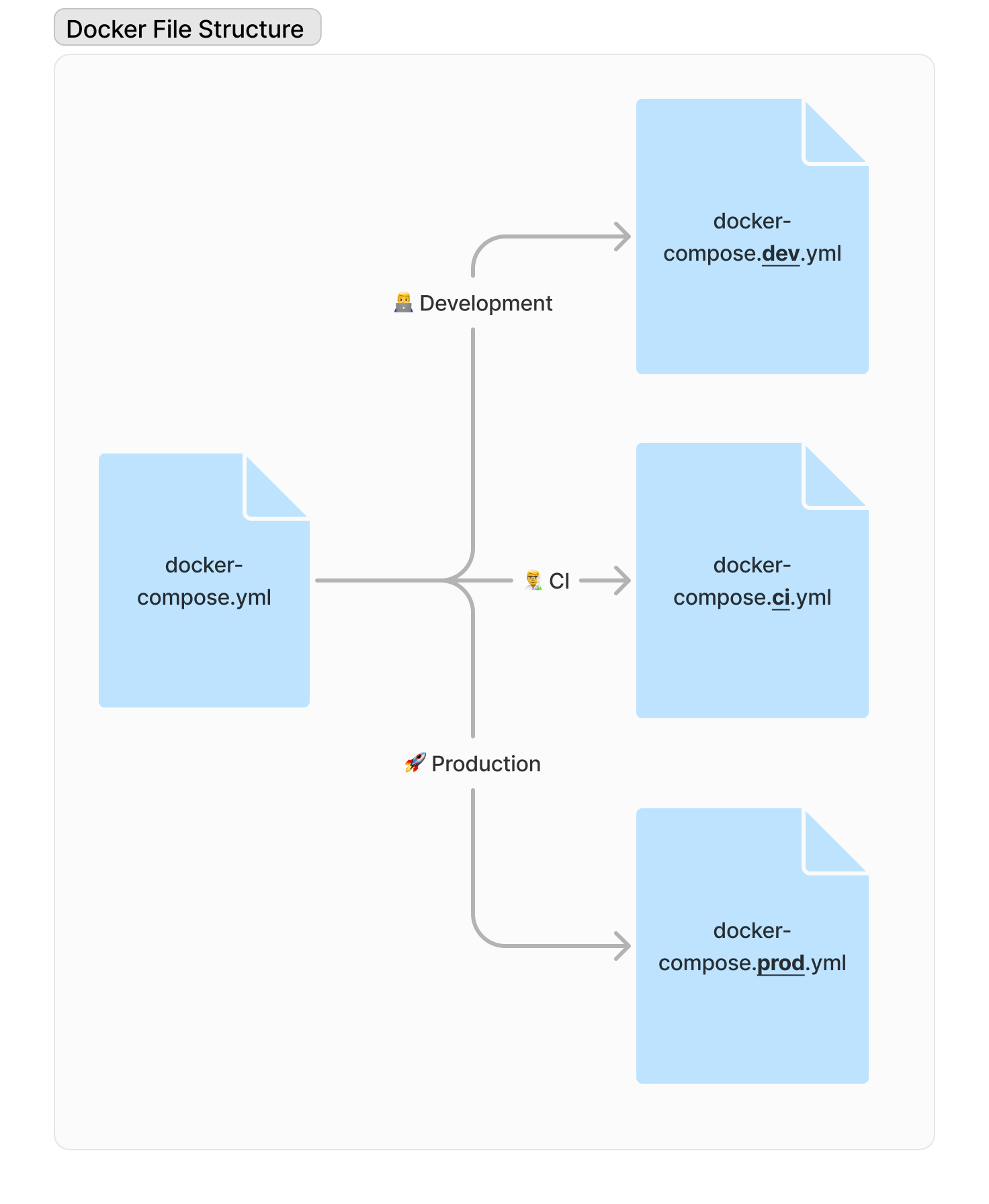
Docker natively selecting these files, but it is a huge pain to type out each time. This is what we would have to type to bring our project up.
docker compose pull && docker compose -f docker-compose.yml -f docker-compose.dev.yml up
Here's how this command compares in Spin:
spin up
Further example
To see this from a code perspective, let's take a look at this:
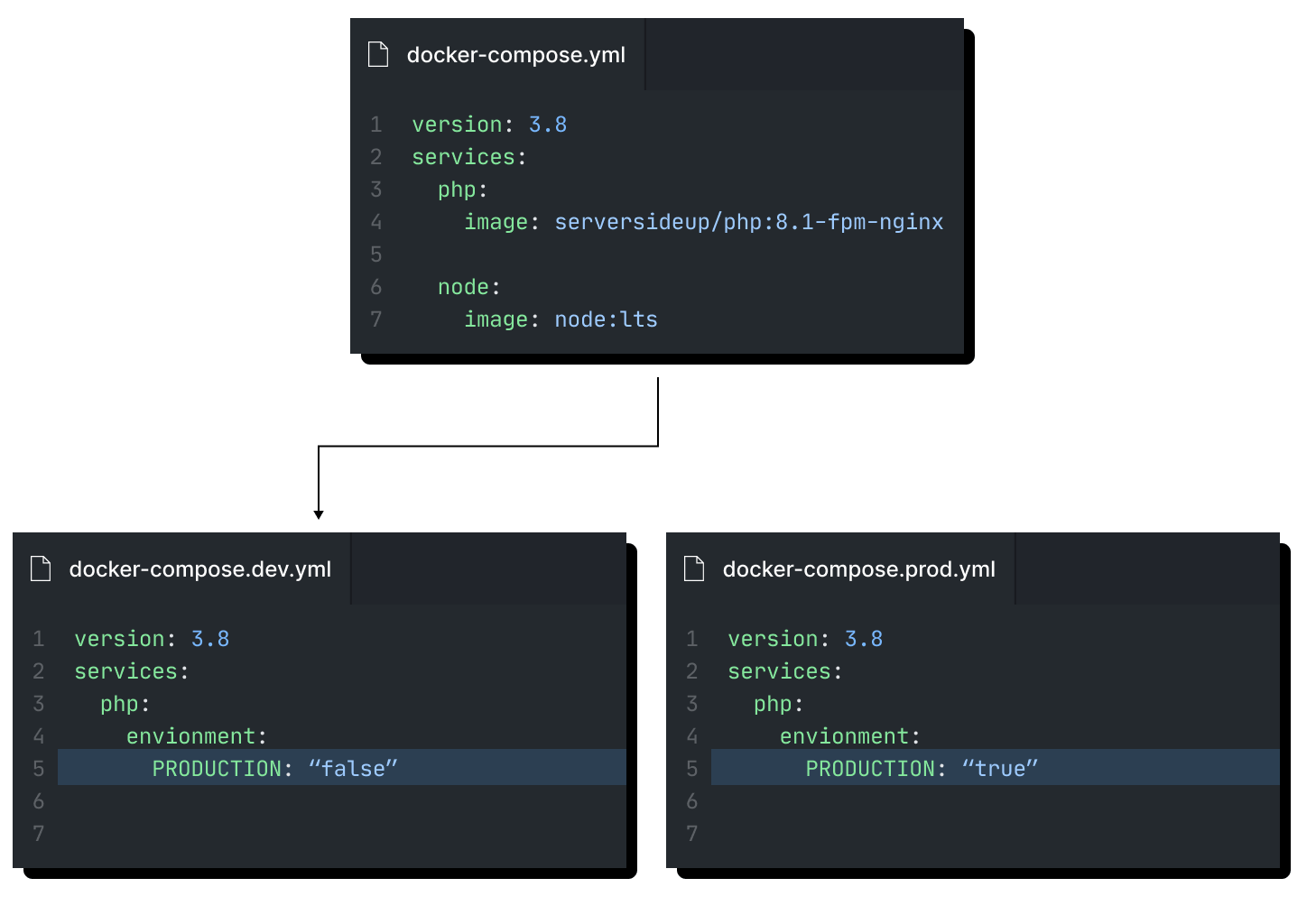
services:
  php:
    image: serversideup/php:8.3-fpm-nginx
    environment:
        PRODUCTION: "false"
  node:
    image: node:lts
You can see the files are merged intelligently so you can manage infrastructure like an "object" in programming.
Spin Syntax
You'll notice Spin follows the same syntax as the tool it's built on top of. For example, spin up runs docker compose up and supports any CLI option that docker compose up supports.
This is intentional by design because we really hate it when tools introduce their own domain specific language on top of other tools. Spin is here to make your process easy and centralized. We follow the design of the other tools we built from so it's easy for you to find developers that are familiar with the technology, find support online, and scale easily from Spin on.
Framework Agnostic
One other thing that we spent a lot of time on is writing everything so Spin is framework agnostic. Containerizing applications gives you incredible power to deliver your application anywhere like never before. We'd be fools if we built Spin to work with just one framework only. The power of Docker enables us to give you quality development environments to all developers (regardless if they are running Mac, Windows, or Linux).
You'll notice Spin is written in vanilla Bash. Yup... you read that correctly. Many people think we're crazy for doing this and they've suggested "X", "Y", and "Z" would have been a better programming language, but the biggest reason why we did this was so we could deliver an experience with no additional development dependency.
We intentionally chose to support Bash V3 so MacOS users can just download it and run it. There's no need for the user to figure out how to install Ruby, upgrade Bash, etc. It just works out of the box.